What Happens After a Message Enters the Queue?.
Publishing a message is only the beginning. This article explains how brokers route messages, how failed work is retried, why poison messages require dead-letter queues, and when priority improves—or destabilizes—a processing pipeline.
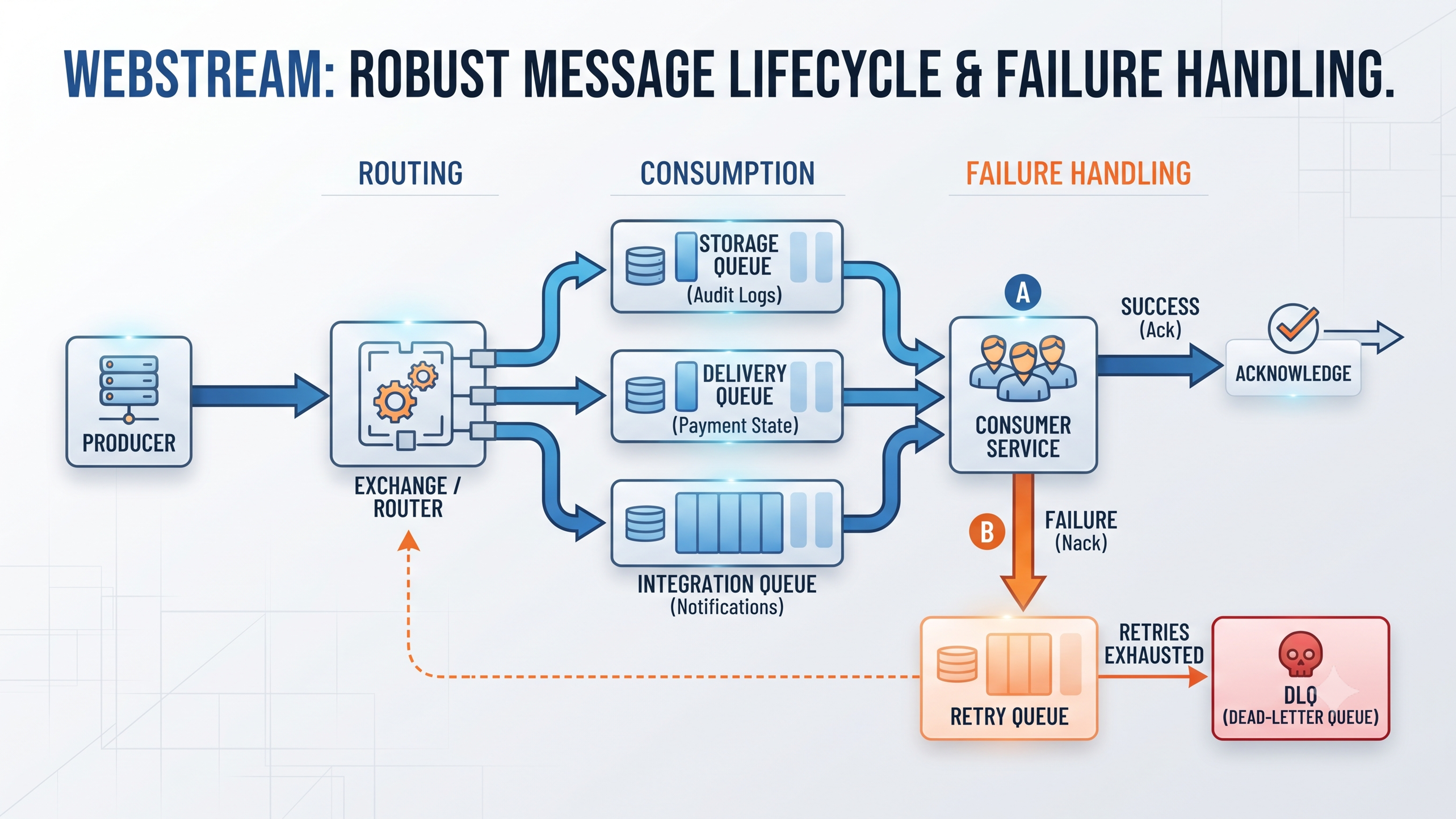
In the first article in this series, we introduced the message queue as a boundary between accepting work and completing it.
For WebStream, that boundary allows a webhook endpoint to authenticate an incoming event, validate it, place it onto durable infrastructure, and respond without waiting for every downstream operation to finish.
But successfully publishing a message does not complete the design.
Once an event enters the messaging system, several questions remain:
- Which systems need to receive it?
- Should every interested system receive a copy?
- What happens when a consumer fails?
- Which failures should be retried?
- When should the system stop retrying?
- Where should permanently unsuccessful messages go?
- Should some messages be processed before others?
A reliable messaging system does more than hold messages temporarily. It defines how responsibility moves through the system when processing succeeds, slows down, fails temporarily, or cannot succeed at all.
Producer
Routing Decision
Queue
Consumer
Success
Success
Acknowledge
Temporary Failure
Temporary Failure
Retry
Persistent Failure
Persistent Failure
Dead-Letter Queue
Routing begins with consumer responsibility
A single webhook event can trigger several distinct side effects.
Consider a payment provider sending WebStream this event:
{ "eventId": "evt_8412", "eventType": "payment.completed", "tenantId": "org_82", "invoiceId": "inv_441", "receivedAt": "2026-07-25T10:00:00Z"}Several systems may care about it:
- the primary billing system must mark the invoice as paid;
- an audit service may preserve an immutable record;
- a notification service may send the customer a receipt;
- an analytics service may update revenue reporting;
- a dashboard service may show the completed payment in real time.
Routing begins by identifying which systems have a legitimate reason to receive the event.
The broker should not send every event to every consumer. Each consumer should receive only the event types it understands and is responsible for processing.
Routing is not only about moving messages. It assigns responsibility for what happens after an event is published.
Once the interested systems are known, the architecture must decide whether those systems share one responsibility or perform independent work.
Competing consumers distribute one responsibility
Suppose WebStream has three workers capable of storing incoming events.
Storage Queue
Worker A
Worker B
Worker C
Each worker performs the same task. Only one of them should process a particular message.
This is the competing-consumer pattern.
The queue distributes messages across available workers so that processing capacity can scale horizontally.
Message 1 → Worker A Message 2 → Worker B Message 3 → Worker C Message 4 → First available workerA competing-consumer design is useful for workloads such as:
- event persistence;
- image processing;
- report generation;
- email delivery;
- invoice generation;
- and webhook transformation.
The workers share responsibility. They do not each need a copy of the same job.
Publish-subscribe distributes information
Now consider billing, audit logging, notifications, and analytics.
These systems perform different work. Processing the event in the billing service does not replace the need to record it in the audit system.
Each interested system therefore needs its own copy.
payment.completed ├──→ Billing queue ├──→ Audit queue ├──→ Notification queue └──→ Analytics queueThis is a publish-subscribe or fanout-style model.
Each queue maintains independent processing state. A failure in the analytics consumer should not prevent the billing consumer from processing its own copy.
The distinction is simple:
Same job, several workers → One queue → Competing consumers → One worker handles each messageDifferent jobs, several systems → Separate queues or subscriptions → Each system receives its own copyEngineering insight
A work queue answers, “Which worker should process this?” Publish-subscribe answers, “Which systems need to know this happened?”
Routing patterns
Brokers commonly support several routing models.
Direct routing
Direct routing sends a message to a queue using an exact routing key.
Routing Key
Payment Completed
Payment Queued
This works well when the destination is known precisely.
WebStream might use keys such as:
event.storage
event.delivery
event.analytics
payment.completed
Fanout routing
Fanout sends a copy of the event to every queue bound to the route.
┌── Storage queue Published event ────┼── Analytics queue └── Dashboard queueThis is appropriate when several independent systems must react to the same event.
Topic routing
Topic routing uses patterns rather than exact matches.
Events might be named:
payment.completed
payment.failed
subscription.created
subscription.cancelled
Consumers can subscribe to patterns such as:
payment.*
*.failed
subscription.*
Topic routing is useful when consumers care about families of events rather than one exact type.
It can also route by source, tenant, region, or severity:
tenant.org_82.payment.completed
security.critical.session_compromised
The more routing information encoded into the key, the more deliberately that naming scheme must be governed.
Independent consumers may still have business dependencies
Although several consumers may care about the same payment event, they are not necessarily safe to run in any order.
The primary system of record must update authoritative business state.
For example, the billing consumer may:
- mark the invoice as paid;
- store the provider’s transaction ID;
- activate a subscription;
- record the amount;
- and preserve the completion timestamp.
The audit system records an immutable history for compliance and accountability.
The notification engine sends customer-facing side effects such as email receipts or SMS confirmations.
At first, it may appear reasonable to broadcast the original payment.completed event directly to all three systems.
payment.completed
|—————Billing Consumer
|—————Audit Consumer
|—————Notification Consumer
This gives every system independent delivery, but it creates a serious correctness risk.
The phantom-receipt race condition
Because the consumers act in parallel, the notification engine may process the event before the billing system commits its database transaction.
It could find the invoice still marked as pending. Worse, it could send a receipt even though the billing transaction later fails.
Notification consumer completes
Receipt sent to customer
Billing transaction fails
Invoice remains unpaid internally
The customer now holds evidence that the application has not successfully recorded.
This is a race condition between an external side effect and the authoritative state transition.
Warning
Parallel delivery can preserve technical independence while violating business ordering.
The external provider has reported a completed payment, but WebStream’s own system has not yet accepted that state.
External events and internal business events therefore represent different facts.
External event: What another system reports happened
Internal domain event: What our application successfully recorded
Commit state before publishing dependent events
A safer architecture routes the external payment event first to the system responsible for committing business state.
External payment.completed
Billing Consumer
Invoice marked paid
Audit Consumer
Audit consumer
Notification Consumer
Notification Consumer
The downstream systems now respond to invoice.payment_recorded, which has a stronger meaning:
WebStream has successfully committed the payment to its own system of record.
The notification engine no longer sends a receipt solely because an external provider reported success. It sends the receipt after WebStream accepts the payment into its authoritative state.
Architecture decision
Route external events to the consumer responsible for committing business state. Publish a new internal event for downstream systems that depend on that state change succeeding.
This introduces a small amount of end-to-end latency before notification begins, but the webhook request still does not need to wait for the email to be sent.
Correct ordering is more important than sending the receipt a few milliseconds earlier.
The dual-write problem
Committing state before publishing an internal event introduces another reliability problem.
The billing service must perform two operations:
- Update the invoice in the database.
- Publish
invoice.payment_recordedto the broker.
These writes occur in separate systems.
Consider the first ordering:
Invoice update succeeds
Application crashes
Internal event is never published
The invoice is marked as paid, but the audit and notification services never learn about it.
Reversing the order creates the opposite failure:
Internal event is published
Application crashes
Invoice transaction never commits
The receipt may be sent even though the invoice remains unpaid.
This is the dual-write problem: the application cannot ordinarily commit a database write and a broker publication within one local transaction.
Closing the gap with a transactional outbox
The Transactional Outbox Pattern solves this by storing the business update and the outgoing event in the same database transaction.
Database transaction
|—————Update invoice to paid
|—————Insert outbox event
Either both writes succeed or both are rolled back.
A separate relay reads pending outbox records and publishes them to the broker.
Invoice transaction
Outbox record commited
Outbox relayed
Message Broker
Audit and notification queues
If the application crashes after the database transaction, the event remains in the outbox and can be published later.
The outbox closes the event-loss gap, but it does not automatically create exactly-once delivery.
The relay may publish the same event twice if it sends the message and crashes before marking the outbox record as completed.
Consumers must still be idempotent.
Engineering insight
The outbox pattern prevents event loss across the database–broker boundary. Idempotent consumers handle duplicate publication.
External webhook events and internal domain events do not necessarily require separate broker infrastructure. They may use the same broker with separate exchanges, topics, namespaces, or queues.
Message broker
|————external.webhooks
|—————Internal.domain-events
The important distinction is semantic, not necessarily physical.
Acknowledgements define broker-level completion
After a consumer receives a message, the broker needs to know whether processing completed successfully.
Queue
Consumer receives message
Processing succeeds
Consumer acknowledges
Broker removes message
An acknowledgement tells the broker that the consumer has completed its responsibility.
But consider this sequence:
Consumer receives message
Email provider accepts request
Consumer crashes before acknowledgement
Broker redelivers message
The email may already have been sent, but the broker has no acknowledgement.
The message is delivered again.
An acknowledgement confirms broker-level completion. It does not prove that every external side effect happened exactly once.
This is why message identifiers and idempotency keys are essential.
Not every failure deserves a retry
When a consumer fails, the system must determine whether another attempt could reasonably succeed.
Retrying every error wastes capacity and can overload unhealthy dependencies.
Never retrying risks losing valid work that failed because of a temporary problem.
The useful distinction is between:
- transient failures;
- permanent failures;
- and ambiguous outcomes.
Engineering insight
Retryability depends on whether the conditions causing the failure can change without modifying the message.
Timeouts are ambiguous outcomes
Suppose the notification consumer calls an email provider and times out.
Three outcomes are possible:
Request never reached provider
Request reached provider but was not processed
Request was processed but the response was lost
The consumer does not know which occurred.
A timeout therefore does not prove failure. It means the outcome is unknown.
Retrying is reasonable, but the retry must be safe.
Where supported, the application should send a stable idempotency key:
receipt-inv-441The provider can use that key to recognize repeated attempts for the same logical notification.
Without idempotency, the customer may receive multiple receipts.
Warning
A timeout is an ambiguous result, not a confirmed failure. Retrying without duplicate protection may repeat the side effect.
HTTP 429 is a flow-control signal
A 429 Too Many Requests response usually means the request is valid, but the provider is currently refusing it because a rate limit has been reached.
The consumer should inspect the Retry-After header where provided.
429 response
Read Retry-After
Schedule delayed retry
Attempt after permitted window
When no retry instruction is available, use exponential backoff with jitter.
Jitter slightly randomizes the retry time so that hundreds of failed messages do not all return at the same moment.
Engineering insight
A429is not only an error. It is a downstream system communicating how quickly it can accept more work.
The worker should reschedule or release the message rather than holding an active consumer slot while sleeping.
Server errors should be retried with limits
Most 5xx responses indicate a problem in the provider’s infrastructure.
Common examples include:
500 Internal Server Error;502 Bad Gateway;503 Service Unavailable;504 Gateway Timeout.
These may succeed once the provider recovers.
But retrying later does not mean retrying forever.
A retry policy should define:
- the maximum number of attempts;
- the maximum retry window;
- the delay strategy;
- which errors are retryable;
- and the final dead-letter destination.
A deterministic provider bug triggered by one specific payload may return 500 every time. Bounded retries prevent that message from consuming capacity indefinitely.
Bad requests should not be retried unchanged
A 400 Bad Request or 422 Unprocessable Entity usually means the message itself is invalid.
Possible causes include:
- malformed JSON;
- missing template fields;
- unsupported values;
- invalid recipient data;
- or an incompatible request format.
Repeating the same request will produce the same result.
- Invalid message
- Retry unchanged
- Same failure
The message should normally be rejected or sent directly to a dead-letter queue.
Not every 4xx response should be treated identically.
A 401 Unauthorized caused by an expired token may succeed after credential refresh. A 429 is explicitly temporary. A 403 Forbidden may require human intervention if the application lacks permanent permission.
Exponential backoff prevents hot retry loops
A failed message should not be returned immediately to the same consumer repeatedly.
Consumer fails
Message immediately returns
Consumer receives it again
Consumer fails again
Capacity is consumed by one broken message
This is a hot retry loop.
A better policy increases the delay after each failure:
Initial attempt fails
Retry 1 fails
Retry 2 fails
Retry 3 fails
Final failure
Dead-letter queue
A reasonable default for a notification workflow is between three and five total attempts.
Too few attempts turn short network partitions, DNS problems, and brief provider incidents into manual work.
Too many attempts allow invalid credentials, deterministic errors, and long outages to fill the active queue for hours or days.
Warning
Unlimited retries do not create reliability. They create immortal failures.
The policy should stop when either the attempt limit or maximum retry window is reached.
Dead-letter when: attemptCount >= maximumAttempts OR messageAge >= maximumRetryWindowPoison messages and dead-letter queues
A poison message repeatedly fails because its data or processing conditions prevent successful completion.
Examples include:
- malformed data that passed earlier validation;
- an unsupported event version;
- a missing referenced account;
- permanently invalid credentials;
- a consumer bug triggered by a specific payload;
- or a destination that no longer exists.
If the message remains in the active queue, it may repeatedly consume worker capacity.
A dead-letter queue isolates it.
Main queue ↓ Consumer ↓ Processing fails ↓ Retries exhausted ↓ Dead-letter queueA DLQ preserves the failed message and its execution context instead of silently discarding it.
But a DLQ is not a waste bin.
Warning
A dead-letter queue is an operational work queue. It requires alerting, inspection, correction, controlled replay, and retention policies.
What a dead-letter record should preserve
A dead-letter entry must help an engineer answer three questions:
- What was the system trying to do?
- Why did it fail?
- Can it be replayed without repeating an earlier side effect?
The record should preserve the original message context:
- message ID;
- event ID;
- event type;
- schema version;
- tenant or organization ID;
- entity identifiers;
- original routing key;
- source queue;
- event creation time;
- and core business payload.
It should also preserve execution history:
- first attempt time;
- last attempt time;
- total attempts;
- retry schedule;
- consumer name;
- application version;
- trace or correlation ID;
- and previous replay attempts.
Error diagnostics may include:
- exception type;
- sanitized error message;
- HTTP status;
- downstream provider;
- timeout classification;
- sanitized response body;
- and the final reason for dead-lettering.
{ "messageId": "msg_8412", "eventId": "evt_7281", "eventType": "invoice.payment_recorded", "tenantId": "org_82", "consumer": "email-notification-worker", "attemptCount": 5, "firstAttemptedAt": "2026-07-25T10:00:00Z", "lastAttemptedAt": "2026-07-25T10:42:00Z", "failureType": "transient-exhausted", "statusCode": 503, "lastError": "Email provider unavailable", "idempotencyKey": "receipt-inv-441", "deadLetteredAt": "2026-07-25T10:42:01Z"}Sensitive information should be sanitized before it enters the DLQ.
Do not preserve raw API keys, authentication headers, full payment credentials, or unrestricted personal data simply because they were present in the failed request.
Replaying dead-lettered messages
Once the underlying issue has been resolved, a dead-lettered message may be eligible for replay.
Inspect failure ↓ Correct message, configuration, or consumer ↓ Verify replay safety ↓ Republish ↓ Confirm successful processingThe important step is verifying whether the side effect may already have occurred.
For example, an email provider may have accepted a receipt even though WebStream timed out before receiving the response.
Replaying blindly may send the receipt again.
The replay workflow should therefore retain and check:
- the original idempotency key;
- whether the side effect is known to have completed;
- the processing checkpoint;
- the replay count;
- and the operator or process that initiated replay
Message priority should reflect business impact
Not all queued work has the same urgency.
Consider four classes of work:
Security alerts Payment confirmations Dashboard updates Analytics jobsSecurity response events deserve the highest priority because delay may increase the duration or impact of an active breach.
Payment confirmations are also high priority because they affect revenue, invoice state, subscription access, and customer trust.
Dashboard updates have medium priority. A short delay may create visible interface lag but does not normally damage authoritative state.
Analytics jobs have the lowest urgency because they generally have little immediate user-facing impact.
Critical └── Security response events High └── Payment confirmations Medium └── Dashboard updates Low └── Analytics jobsThe useful measure of priority is business consequence, not simply which message arrived first.
Why one global priority queue is risky
A broker-level priority queue can place high-priority messages ahead of ordinary work.
Priority queue ├── Security response 10 ├── Payment confirmation 8 ├── Dashboard update 5 └── Analytics job 2But continuous critical traffic may prevent low-priority work from being processed.
Critical messages keep arriving ↓ Workers always select critical work ↓ Analytics backlog never drainsThis is starvation.
A global priority queue also makes scaling and diagnosis less precise. A queue depth of 20,000 messages does not immediately reveal whether revenue events, dashboard updates, or offline analytics are falling behind.
Separate queues provide explicit service classes
A safer architecture places different workload classes into separate queues.
Published events ├── Critical security queue ├── Payment queue ├── Dashboard queue └── Analytics queueEach queue can have:
- dedicated consumers;
- reserved processing capacity;
- independent scaling rules;
- workload-specific rate limits;
- its own retry policy;
- separate dead-letter handling;
- and different service-level expectations.
Critical security queue ↓ Reserved security workers Payment queue ↓ Dedicated payment workers Dashboard queue ↓ Real-time delivery workers Analytics queue ↓ Background workersThis creates resource isolation.
A large analytics backlog cannot consume every worker required for payment or security processing.
It also allows targeted scaling:
Payment queue depth rising → Add payment workers Analytics queue depth rising → Increase background capacity or tolerate delaySeparate queues also make observability clearer.
Instead of seeing one undifferentiated backlog, operators can see whether the affected work relates to security, revenue, user experience, or reporting.
Architecture decision
Use separate workload queues when message classes have different latency, scaling, retry, or isolation requirements.
Limited priority may still be useful inside one workload class.
For example:
Payment queue Priority 3 → Fraud-sensitive review Priority 2 → Customer payment confirmation Priority 1 → Historical reconciliationThese messages share the same business domain and processing infrastructure, making internal priority easier to reason about.
Trade-off
Separate queues increase operational configuration, but they make capacity allocation, failure isolation, and service guarantees explicit.
A WebStream routing design
A practical WebStream design could separate event responsibilities as follows:
Webhook ingestion service
↓
Event router
├──→ Event storage queue
│ ↓
│ Storage workers
│
├──→ Dashboard delivery queue
│ ↓
│ Delivery workers
│
├──→ Analytics queue
│ ↓
│ Analytics workers
│
└──→ Integration queues
↓
Integration workers
Each path has different requirements.
Event storage prioritizes durability.
Dashboard delivery prioritizes low latency and may safely discard obsolete intermediate updates in some cases.
Analytics can tolerate a longer backlog.
External integrations need provider-specific rate limits, delayed retries, idempotency, and dedicated dead-letter queues.
Different consumers should not automatically share one failure policy merely because they originated from the same external webhook.
The complete message lifecycle
A reliable messaging workflow defines both the successful path and every meaningful failure path.
External event
Validate and route
Authoritative consumer
Commit business state
Publish internal event through outbox
Route to independent queues
Success
Success
Acknowledge
Temporary failure
Temporary failure
Delayed retry
Permanent failure
Permanent failure
Dead-letter
Attempts exhausted
Exhaust attempts
Dead-letter
Routing decides which systems receive responsibility.
Acknowledgements tell the broker when a consumer considers that responsibility complete.
Retry policies determine whether failed work should run again.
Dead-letter queues isolate messages that cannot currently succeed.
Workload queues determine which classes of work receive protected capacity.
None of these policies eliminates failure.
They make failure explicit, bounded, visible, and recoverable.
A reliable queue design must define more than where successful messages go.
It must also define:
- which consumers need each event;
- which business actions depend on committed state;
- which failures may succeed later;
- how retries are delayed and bounded;
- when failed messages are isolated;
- what evidence is retained for diagnosis;
- how replay is performed safely;
- and which workloads receive protected processing capacity.